


KinCony Pi5R8 – Raspberry Pi CM5 8-Channel Relay Automation Server
Frequently Bought Together
-
All‑in‑One I/O Integration
8× relays, 8× isolated digital inputs, 4× analog inputs (0‑5V & 4‑20mA), 2× PWM outputs – no extra modules needed. -
Local Automation Hub
Run Home Assistant, Node‑RED, or Linux software locally without monthly fees or cloud dependency. Your data stays in your home. -
Flexible Storage & Expansion
microSD card slot for Lite modules, plus M.2 PCIe socket for high‑speed NVMe SSDs. -
Serial Connectivity
Built‑in RS232 and RS485 ports for direct communication with legacy industrial equipment, sensors, and actuators.
- High‑Performance Processing: The Raspberry Pi Compute Module 5 (CM5004000) delivers significantly improved CPU performance compared to previous generations, perfect for demanding automation tasks.
- Rich Display & GPIO Options: Includes a full‑size HDMI 2.0 port for monitors, optional GPIO extender provides 20 free pins for custom hardware.
- Industrial Enclosure: Robust aluminum shell with active cooling (heatsink + fan) ensures reliable 24/7 operation.
| Category | Specification |
|---|---|
| General Specifications | |
| Core Processor | Raspberry Pi Compute Module 5 (CM5) ▪ Default: CM5004000 (4GB RAM Lite) |
| Memory | 4GB LPDDR4X (on‑module) |
| Storage | microSD card slot (for CM5 Lite) |
| Networking | ▪ Gigabit Ethernet (RJ45, 10/100/1000 Mbps) ▪ IPv4/IPv6 support |
| Video Output | 1 × full‑size HDMI 2.0 port |
| USB Ports | ▪ 2 × USB 3.0 Type‑A sockets ▪ 1 × USB‑C (data transmission) |
| Power Supply | 12‑24 VDC |
| Cooling | Heatsink + fan |
| Operating Temperature | -20°C to 70°C |
| Operating Humidity | 20% – 80% (non‑condensing) |
| Enclosure Material | Aluminum shell |
| Dimensions | 202 × 105 × 58 mm |
| Mounting | 35 mm DIN rail |
| Relay Output Specifications | |
| Channels | 8× SPST-NO / Form A (COM / NO) |
| Maximum Load | ▪ 250 VAC / 10 A (resistive) ▪ 125 VAC / 12 A (resistive) |
| Mechanical Life | > 10 million operations |
| Electrical Life | > 100,000 operations (at rated load) |
| Digital Input Specifications | |
| Channels | 8× optocoupler‑isolated, dry contact |
| Cable Length | Up to 500 m (dependent on installation) |
| Analog Input Specifications | |
| Channels | 4 channels (2× 0‑5V DC + 2× 4‑20mA loop‑powered) |
| PWM Output Specifications | |
| Channels | 2× PWM (pulse‑width modulation, duty cycle adjustable) |
| Communication Interfaces | |
| Ethernet | Gigabit (RJ45) – 10/100/1000 Mbps |
| Serial | ▪ 1× RS232 ▪ 1× RS485 |
| USB | 2× USB 3.0 Type‑A + 1× USB‑C (data transmission) |
| Video | 1× full‑size HDMI 2.0 |
| Expansion | ▪ M.2 M key PCIe socket ▪ CM5 GPIO extender (optional accessory) |
| Free GPIO Expansion | |
| GPIO Pins | 20× free pins (directly accessible from CM5 module) GPIO21, GPIO20, GPIO16, GPIO01, GPIO07, GPIO08, GPIO25, GPIO24, GPIO23, GPIO18, GPIO26, GPIO19, GPIO06, GPIO00, GPIO11, GPIO09, GPIO10, GPIO22, GPIO27, GPIO17 |
| Additional I/O | DIP switch for jumpers |
| Onboard Display | SSD1306 128×64 OLED (I²C) |
| Software Support | |
| Software | Home Assistant, Node‑RED, Raspberry Pi OS, MQTT, Modbus RTU/TCP, Docker, Python, and other Linux‑based automation software |
| Default CM5 Configuration | |
| CM5 Module | CM5004000 Lite version (optional) |
| Wireless | None (no Wi‑Fi / Bluetooth on this variant) |
| RAM | 4GB LPDDR4X |
- microSD Card Support: If you are using a CM5 module with onboard eMMC storage, the microSD card slot cannot be used. The microSD slot is only available when using a CM5 Lite module.
-
Programming the CM5 via USB‑C: To access the CM5 eMMC or microSD storage through USB‑C:
- Connect the Pi5R8 to your computer using a USB‑C cable.
- Run the Raspberry Pi
rpibootutility. - The eMMC or microSD storage will appear as a removable drive.
- Flash Raspberry Pi OS or other Linux distributions directly.
- Pi5R8 Mainboard
- CM5 Module (CM5004000) – 4GB RAM Lite Version
- Heatsink
- Cooling Fan
- Pi5R8 Mainboard
- Heatsink
- Cooling Fan
Packing List
Version
Version


Note: The Base Version includes the baseboard only — no CM5 module and no cooling module. The Complete Version ships fully assembled with the CM5 and cooling module factory pre-installed.
Pi5R8 vs Pi5M8 vs Pi5R32 vs Pi5R16
Shared Features: Raspberry Pi CM5 (N16R8) · DC 12–24V · 100M Ethernet + Wi-Fi + Bluetooth · DS3231 RTC · 4× ADS1115 16-bit ADC · SSD1306 OLED display · microSD (SPI) + M.2 PCIe NVMe · RS232 + RS485 · 2× PWM · DIN-rail mounting · Home Assistant / Node-RED / Docker support.
Key Differences
| Item |
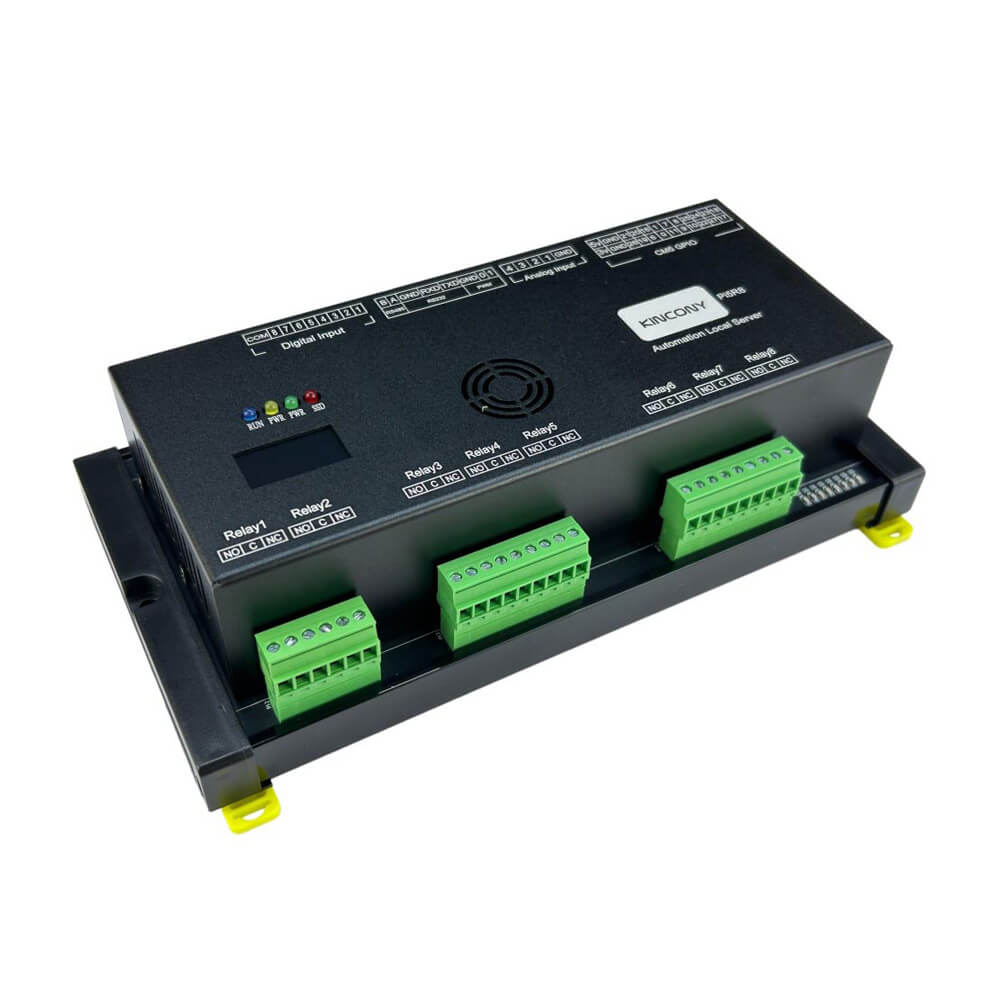 Pi5R8 (8CH Relay) |
 Pi5M8 (8CH MOSFET) |
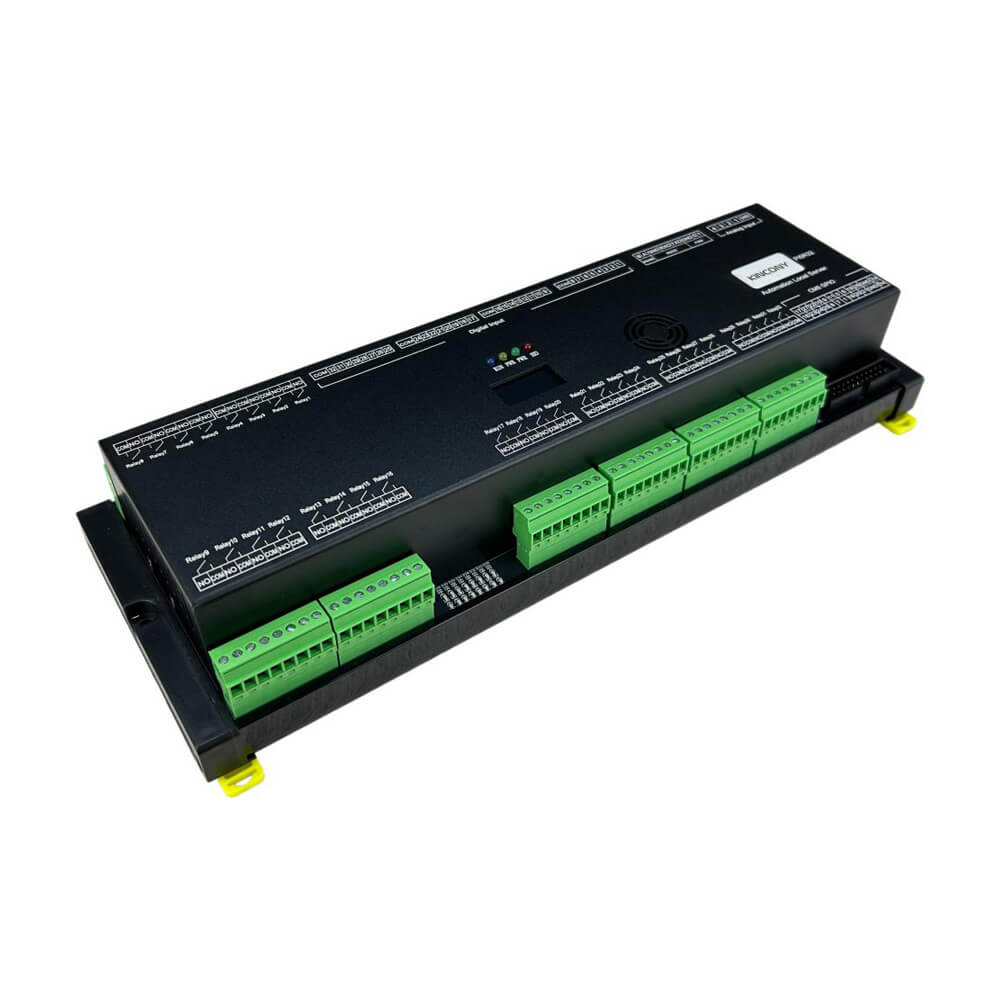 Pi5R32 (32CH Relay) |
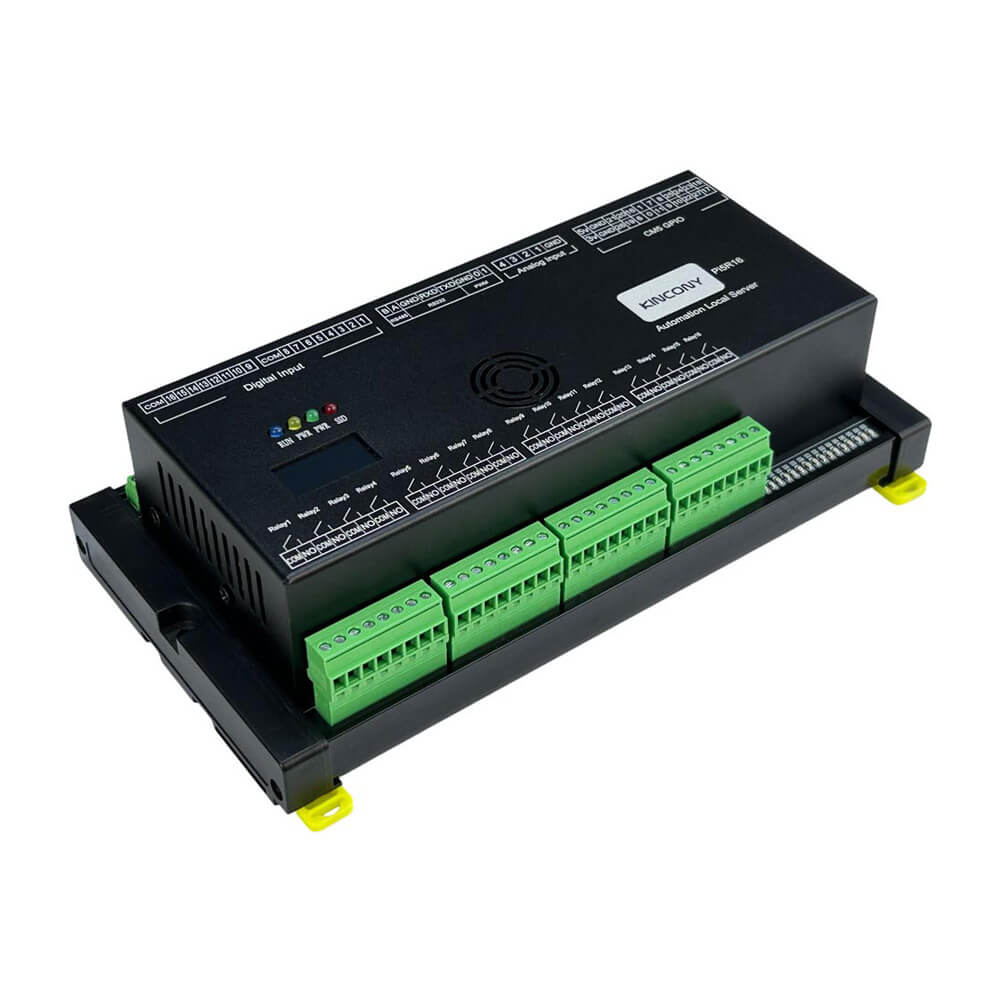 Pi5R16 (16CH Relay) |
|---|---|---|---|---|
| Output Type | 8× Relay (SPST-NO / Form A) | 8× MOSFET DC Switch | 32× Relay (SPST-NO / Form A) | 16× Relay (SPST-NO / Form A) |
| Load Capability | AC 250V / 10A per channel (DC loads also supported within rating) |
DC only, 2A per channel (continuous) | AC 250V / 7A per channel (DC loads also supported within rating) |
AC 250V / 7A per channel (DC loads also supported within rating) |
| Best For | Compact AC/DC control at the edge — small panels, remote nodes | DC-only loads requiring fast switching or PWM — LED strips, solenoids, DC motors | High-density AC/DC loads — large lighting panels, building automation | Mid-density AC/DC loads — lighting, HVAC zones, pumps, contactors |
| Digital Inputs | 8× opto-isolated | 8× opto-isolated | 32× opto-isolated | 16× opto-isolated |
| Switching | Mechanical contact; audible click, slower | No contact, silent, high-speed; supports PWM | Mechanical contact; audible click, slower | Mechanical contact; audible click, slower |
| Dimensions | 202 × 105 × 58 mm | 170 × 105 × 58 mm | 298 × 105 × 58 mm | 202 × 105 × 58 mm |
Which One Should You Choose?
Choose Pi5R8 if you need:
- 8 independent AC/DC loads in a compact, cost-effective package
- Highest per-channel rating (AC 250V / 10A) — relays switch both AC and DC
- Edge or remote nodes — small control cabinets, distributed installations
- Only a few outputs locally while keeping full CM5 compute power
Choose Pi5M8 if you need:
- DC-only loads requiring fast switching or PWM — LED strips, solenoids, DC motors, actuators
- Silent operation and longer lifespan (no mechanical contacts)
- High-frequency switching that would wear out a mechanical relay
- All loads share the same DC voltage (12–24V recommended)
Choose Pi5R32 if you need:
- 32 independent AC/DC loads — large lighting panels, building automation, complex control cabinets
- Maximum I/O density — 32 outputs + 32 inputs in a single DIN-rail unit
- DC loads within relay rating (AC 250V / 7A per channel)
- When 16 channels are not enough and you want to avoid stacking multiple controllers
Choose Pi5R16 if you need:
- 16 independent AC/DC loads — lighting circuits, HVAC zones, pumps, contactors
- DC loads within relay rating (AC 250V / 7A per channel)
- Balanced I/O density — 16 outputs + 16 inputs in a compact DIN-rail unit
- Same relay quality and software ecosystem as Pi5R32, with lower cost and smaller footprint
I. Software Stack Options & Features
| Solution | Ideal For | Key Advantages |
|---|---|---|
| 1. Home Assistant (Most Popular) | Smart Home & Building Automation |
✔ Full local control — no cloud dependency ✔ Auto-discovers MQTT, Modbus, and GPIO devices ✔ Rich dashboard + mobile app + voice assistants ✔ 2,000+ integrations for sensors, lights, HVAC ✔ Install via Docker or Supervised on Raspberry Pi OS |
| 2. Node-RED (Recommended for Logic) | Visual Automation & Data Flows |
✔ Browser-based flow editor — no coding required ✔ MCP23017 nodes for direct relay control ✔ MQTT, Modbus, HTTP, WebSocket nodes built-in ✔ Pre-built flow available for the Pi5R8 ✔ Ideal for complex automation logic and data routing |
| 3. Python / Custom Code | Developers & Integrators |
✔ Direct I/O control via gpiozero or libgpiod✔ Full access to RS232 (/dev/ttyAMA0) and RS485 (/dev/ttyAMA2) ✔ Python scripts, Flask APIs, scheduled tasks ✔ Supports C++, Node.js, Go, and any Linux language |
| 4. Docker & Container Stack | Advanced Deployments |
✔ Run Home Assistant, Node-RED, Mosquitto, Grafana together ✔ Docker Compose for reproducible deployments ✔ Isolated services — easy backup and migration ✔ M.2 NVMe or SSD for container storage |
| 5. openHAB / Domoticz / Other | Alternative Platforms |
✔ openHAB for rule-based automation ✔ Domoticz for lightweight home control ✔ Any Linux-compatible automation platform runs natively |
II. Hardware Interface & Pin Reference
The Pi5R8 I/O is managed by the CM5's GPIO and UART buses, with digital I/O expanded through MCP23017 chips on the I2C bus. Below are the key device mappings. For full pin definitions, see the GitHub link at the bottom of this table.
| Interface | Device / Mapping |
|---|---|
| RS232 Serial | /dev/ttyAMA0 — default UART, enabled by default on Raspberry Pi OS (GPIO14 TX / GPIO15 RX) |
| RS485 Serial | /dev/ttyAMA2 — requires dtoverlay=uart2 in /boot/firmware/config.txt (GPIO4 TX / GPIO5 RX) |
| Relay Outputs | 8× relay outputs controlled via MCP23017 I2C expanders — use node-red-contrib-mcp23017chip or gpiozero (Python) |
| Digital Inputs | 8× opto-isolated inputs read via MCP23017 — use node-red-contrib-mcp23017chip or Button class in gpiozero |
| Analog Inputs | 4× ADS1115 16-bit ADC at I2C 0x48 — use node-red-contrib-ads1x15_i2c or Python |
| OLED Display | SSD1306 128×64 at I2C 0x3C — use node-red-contrib-oled-i2c |
| I2C Bus | Enable via raspi-config → Interface Options → I2C (GPIO2 SDA / GPIO3 SCL, /dev/i2c-1) |
| Full Pin Definitions | Pi5R8 pin definition (GitHub) |
For a complete overview of the CM5 GPIO resources and alternate functions, refer to the diagram below. The Pi5R8 uses only a subset of these pins; full details are in the GitHub pin definition linked above.

III. Getting Started Guide
Step 1: Install Raspberry Pi OS
Download Raspberry Pi Imager, select Raspberry Pi 5 / CM5 as the target device, and flash Raspberry Pi OS (Bookworm or later) to a microSD card or eMMC/SSD. Full installation guide →
Step 2: Enable Interfaces
In the Pi OS configuration, enable I2C and Serial Port. Then edit /boot/firmware/config.txt and add dtoverlay=uart2 to enable RS485 on /dev/ttyAMA2. Reboot.
Step 3: Install Automation Software
Install your preferred stack: Home Assistant via Docker, Node-RED via the install script, or use Python (gpiozero) for custom control.
IV. Node-RED Quick Start: Control 8 Relays in Minutes
FeedCurrent provides a ready-to-import Node-RED flow for the Pi5R8 (shared with Pi5M8). The flow maps all 8 relays and digital inputs to inject nodes for testing, plus OLED display, analog input reading, RS232/RS485 test, and PWM control. Download flows.json from our GitHub and import directly into Node-RED.
| Resource | Link |
|---|---|
| Node-RED Flow (Pi5R8 / Pi5M8) | node_red_flows/Pi5M8/ (flows.json) |
| Setup Tutorial | How to install Node-RED and import flows on Pi5 → |
| Node-RED MCP23017 Node |
node-red-contrib-mcp23017chip — for digital input and output control
|
| RS485 Modbus Setup |
Use node-red-contrib-modbus with /dev/ttyAMA2 at 9600/19200/38400 baud
|
Looking for software solutions for other products?
View All Product Software Solutions →